Local AI Models Selection
Local AI models in Shinkai are powered by Ollama and are constantly being updated.
Understanding AI Models
If you're looking to install a local AI model but aren’t sure where to start, understanding the key features of each model can make your decision easier. Factors like the number of parameters and quantization levels help determine which model suits your needs.
Whether you’re using it for casual text generation or advanced AI tasks, learning these basics ensures you pick the right model for your device and tasks. Let's break down these features to help guide your choice.
e.g., 8B, 12B, 70BParameters definition
Parameters refer to the model's size in terms of billions of parameteers. These are the internal settings of the model that are adjusted during training, determining how well it can learn, predict, generate text, or recognize patterns. The more parameters a model has, the more detailed and powerful it can be, though it also requires more computing power. Some examples:
e.g., LLaMA 8B- Uses: Suitable for tasks like general text generation, chatbots, and lightweight language understanding.
- System Requirements: Requires around 16GB of RAM and an 8-core CPU. A GPU is optional but improves performance.
e.g., Mistral-Nemo 12B- Uses: Best for longer-context tasks, such as multi-lingual support and more complex text generation.
- System Requirements: Needs at least 16GB of RAM and a strong CPU; GPU is recommended for better speed.
e.g., LLaMA 70B- Uses: Ideal for large-scale tasks like data analysis, advanced text generation, and more sophisticated AI tools.
- System Requirements: Requires 32GB RAM, high-end CPUs, and a GPU for optimal performance due to its complexity.
e.g., Q4, Q8, FP16Quantization definition
Quantization is a technique used to reduce the size of AI models by simplifying the number of bits used to represent the parameters. This makes the model faster and more efficient without drastically losing accuracy. Here are some examples:
4-bit QuantizationThis reduces memory usage and speeds up computation, making it ideal for devices with limited resources or when model size needs to be minimized. Choose this when you need efficiency over slight reductions in accuracy.
8-bit QuantizationA balance between performance and precision. It’s suitable for most tasks where some compression is acceptable but higher accuracy is still required.
16-bit Floating PointMaintains high accuracy while reducing model size compared to FP32. Best for tasks where accuracy is more important but some efficiency is needed.
You might find models versions specified as this: model_8b-v.23-q3_K_S.
Here's a breakdown of what each part likely means:
- model - the name of the model.
- 8b - stands for 8 billion parameters.
- v.23 - might represent the version or a specific variant of the model.
- q3 - refers to quantization at level 3.
- K - likely refers to the type of quantization strategy used.
- S - might stand for a specific optimization applied to this model, such as speed improvements or memory efficiency tweaks.
AI Models Comparison
Choosing the right AI model depends on the task you want to perform and the specs of your device. Models may have different versions to install, here are a few examples:
| Model | Parameters | Quantization | Best For |
|---|---|---|---|
| Llama3.1 | 8B, 70B, 405B | Q8, FP16 | Advanced tools, large-scale tasks |
| Gemma2 | 2B, 9B, 27B | Q8 | Efficient text generation and language tasks |
| Mistral-Nemo | 12B, 70B | Q4 | Long-context tasks, multi-lingual support |
| Qwen2 | 0.5B, 1.5B, 7B, 72B | Q4, Q8 | Text processing, general AI tasks |
| Deepseek-Coder | 16B, 236B | Q8, FP16 | Code generation, fill-in-the-middle tasks |
| CodeGemma | 2B, 7B | Q8 | Code generation, instruction-following tasks |
Browsing Local AI Models in Shinkai
Shinkai offers you a wide array of models to choose from. To browse the whole list of local AI models in Shinkai, click the AIs option of the left side menu > Click the Show all models option below the recommended models.
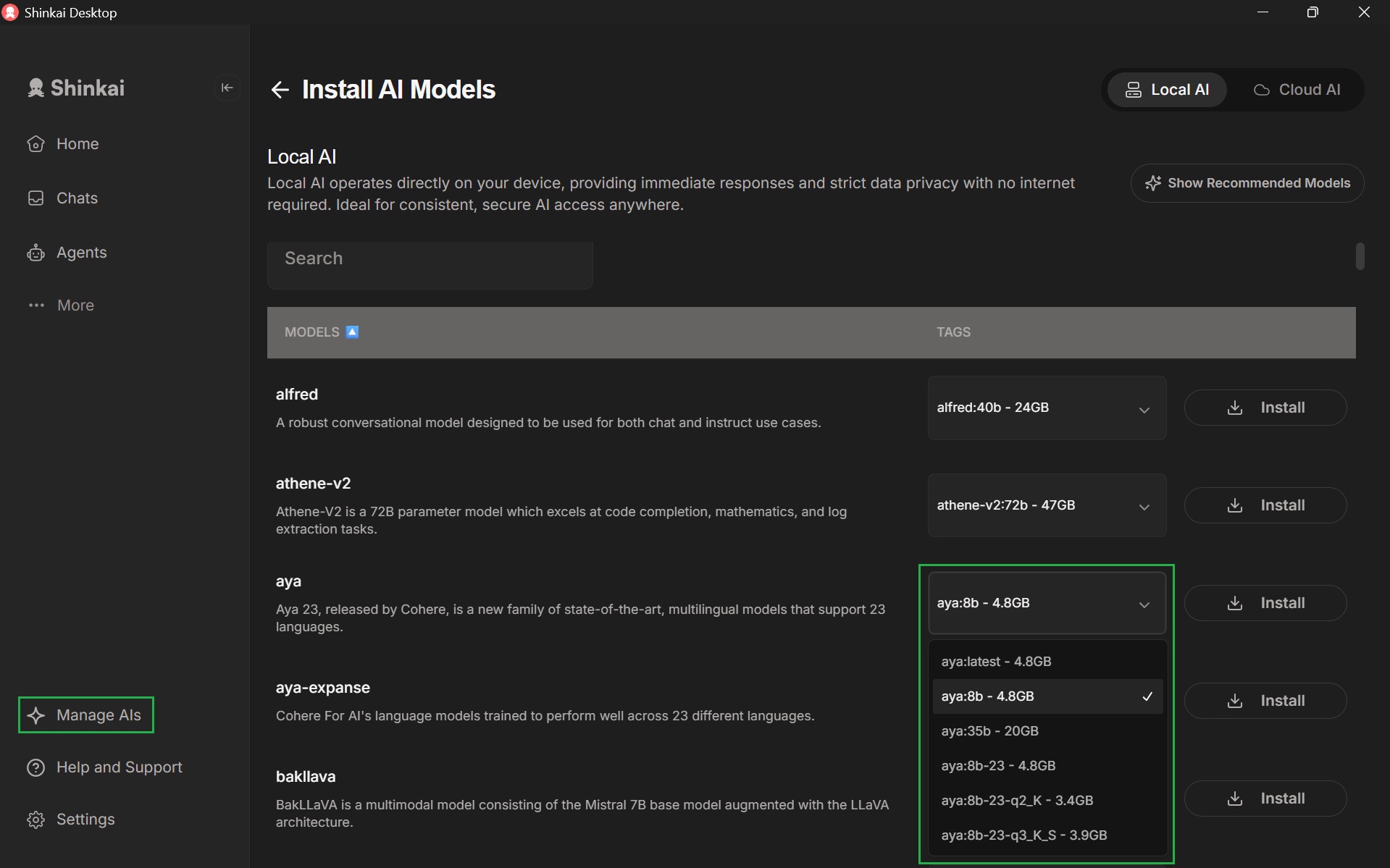
In this view you can access the different agents available in Shinkai. In the Tags column next to each model you can see that each offers several size variants (e.g., 8b, 35b). These numbers refer to the number of parameters in the model, which directly affect the model’s performance, speed, and the hardware resources required.
You can choose the version of the model you'd like to install in the dropdown menu next to the model's name.
Refer to the parameters and quantization guidelines to help you make the best choice for your device and task.